
|
MoonC.mobi |
|
Mobile aMobile Apps for your Active Enjoyment for your Active Enjoyment |

|
MoonCBook Manual Android |
Finance |
|
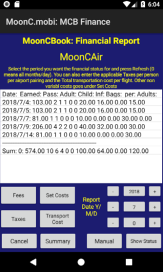
Here you can create and view financial reports over earned income by day, moth or year Select your period and press Get Now. If you select a year and 0 iin month you get a number per month for seats sold and fare earned for each category per month plus summaries per month and category. If you select a specific month there will be a breakdown per day. There are also options for breaking it down per leg.
There is a number of buttons for setting basic system wide data as booking fees, and costs that can be used in financial presentations tba,
This page has 4 buttons at the bottom.
“Cancel” Will bring you back to the Main Menu Page.
“Exceptions” Is where to set individual day /period price exceptions. Manual” brings you to this page of the MoonCBook manual on the MoonC.mobi website. -“Get Now” Calculates the updated data and presents them to your screen.
Calculation of the numbers for a whole year may take a long time for a busy system. In the fully paid version there is an option for running these aggregates scheduled on a daily basis at times when your system is less busy with customer traffic.
. .
|