
|
MoonC.mobi |
|
Mobile aMobile Apps for your Active Enjoyment for your Active Enjoyment |

|
MoonCBook Manual Android |
Roster Config |
|
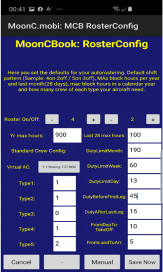
This page let crew controller supervisors set defaults for automated rostering. This includes normal duty on/off for your company. Most of these settings are determined by legal requirements but: Yr max hours means calendar year. Last 28 means last 28 days also called last month. Duty Before First Leg is the duty time in minutes before first departure. Duty After Last Leg is duty time to add after last arrival time of the shift. From Dep To Take Off is time in minutes to deduct between departure and actual take off to calculate block hours if no specific time for take off is registered. From Land To Arr is the same after landing to registered Arrival. Crew needs will be by virtual aircraft type and Type1/5 means crew types.
This page has 4 buttons at the bottom.
“Cancel” Will bring you back to the Crew Page.
“-” for future enhancements. “Manual” brings you to this page of the MoonCBook manual on the MoonC.mobi website. “Save Now” (If permission) saves the updated settingss to the backend.
In this version you can only save the crew requirements for 1 aircraft type
|